How departments work
A department has people and tables. Who can see what, and the two kinds of role.
Overview
A department is a team inside your organisation, such as Finance, Sales or Marketing. It holds two things: people and tables. The people in a department can ask Mira about its tables, and nobody else can. That is how Mira keeps Finance's budgets away from people who have no reason to see them, without anyone having to set rules table by table.
People and tables
People. Each person in a department has a role there: Lead, Maintainer or Member. The Lead runs the department. They decide who is in it and what each role may do. People and roles shows how.
Tables. A department's tables come from two places. Some are uploaded straight into the department. Others are shared with it from the organisation, such as a table from a connected system. Department data shows where they live and how to organise them.
Who can see what
What you can ask about follows the departments you are in.
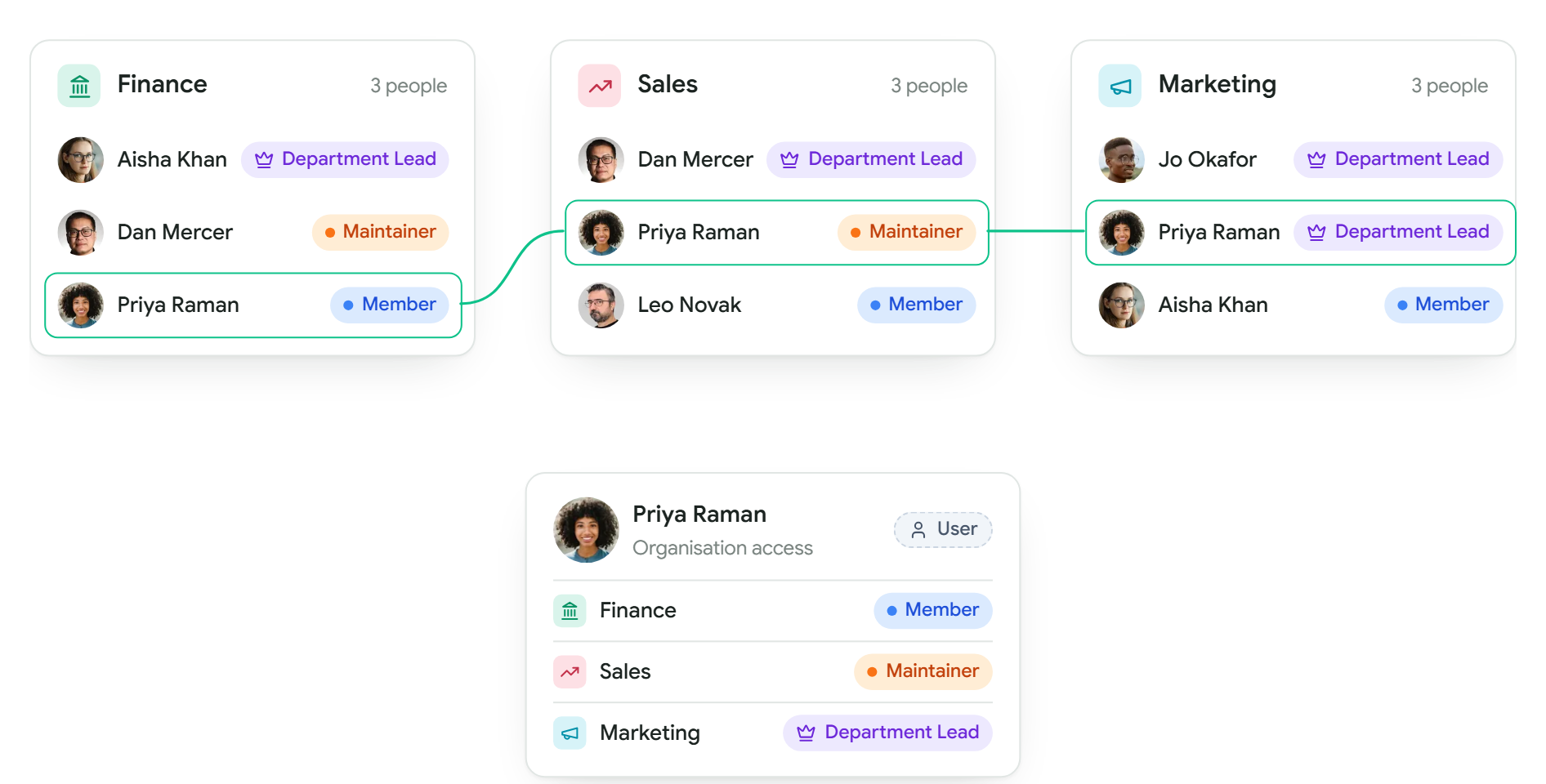
- At Kestrel Outdoor, Priya is in all three departments: a Member of Finance, a Maintainer in Sales and a Lead of Marketing. She can ask about the tables of all three.
- Aisha leads Finance and is a Member of Marketing. She sees Finance and Marketing, but nothing that belongs only to Sales.
- Leo is only in Sales. Finance's budgets never appear for him, in answers or in the catalogue.
A person can be in any number of departments, with a different role in each. Dan leads Sales and is a Maintainer in Finance.
Roles
Everyone in Mira holds two separate things. Their organisation access says what they can do across the whole organisation. Their department role says what they can do inside one department. The two never mix: being an Admin does not make you a Lead, and leading a department does not make you an Admin.
Organisation access
| Access | What it means |
|---|---|
| Owner | Everything an Admin can do. Usually the person who set the organisation up. |
| Admin | Invites people, connects and shares data, and changes organisation settings. Can see every table. |
| User | Uses Mira. Sees the tables of the departments they are in. |
Department roles
| Role | What it means |
|---|---|
| Lead | Runs the department. Can always do everything in it: people, tables and who may see them. |
| Maintainer | Can do what the Lead switches on for Maintainers, often looking after the department's data. |
| Member | Can do what the Lead switches on for Members, usually asking about the department's tables. |
Organisation access is set in Settings, Members by an Owner or Admin. See Members and access. Department roles are set on the department's People page by its Lead, or by an Owner or Admin. See People and roles.
A User can lead a department. Most Leads are Users: they run their own team's data without seeing anyone else's.
Creating a department
Owners and Admins create departments. Open Settings, and under Departments choose Create a department. Give it a name and a short description, pick its Lead from the people in your organisation, and click Create department. A department can have more than one Lead. Your plan sets how many departments you can have, and the window shows how many you have used.
Once a department has a Lead, the Lead finds it in the sidebar under Department Management, with its People and Data pages. People and roles and Department data walk through each.