Held uploads
Reviewing files that were held.
Overview
Sometimes Mira can't read a file someone uploads. The sheet might have no headings, or two tables on one page. When that happens, the person uploading can send the file to an admin instead of giving up. The file is held in a queue, and an owner or admin fixes it and sends it back in.
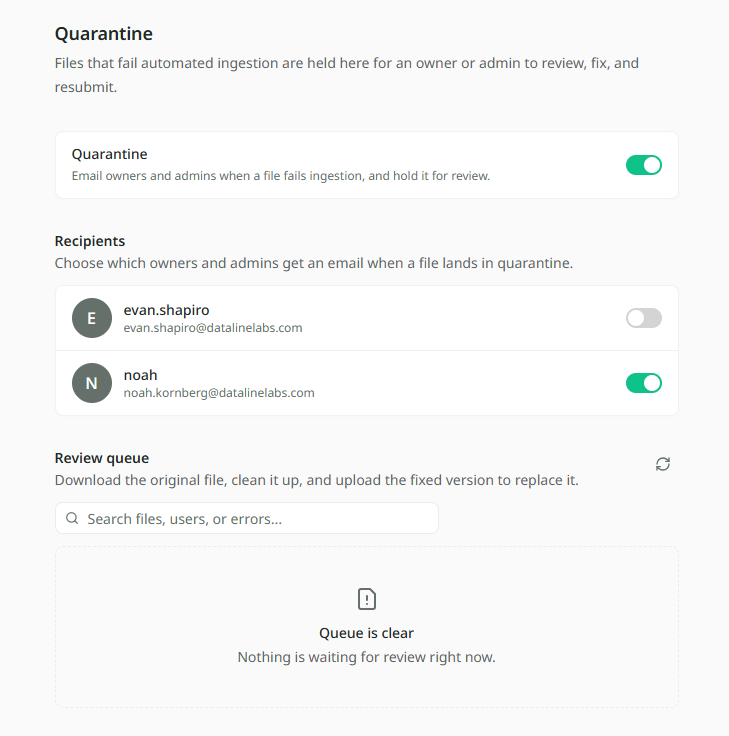
Held files live on the Quarantine page in Settings. Owners and admins can see it.
Why a file gets held
A file is held when someone uploading it chooses Send to an admin. They see that choice when Mira finds a problem it can't get past, for example:
- the first row isn't column names
- there's more than one table on a sheet
- rows have different lengths
- the file isn't a CSV or Excel file
Uploading files shows what the person uploading sees, and the other choices they have.
Turning it on
Review is off until an owner or admin turns it on. While it is off, people uploading don't get the choice to send a file to an admin.
- Open Settings and choose Quarantine.
- Turn on the Quarantine switch.
- Under Recipients, switch on each owner or admin who should be emailed when a file is held.
Turning the switch off stops the emails for everyone.
Reviewing held files
The Review queue lists every held file, with who uploaded it and when. Use the search box to find a file by name, person or problem.
- Click a file to open it. Why it was held says what is wrong.
- Click Download original to get the file as it was uploaded.
- Fix it on your computer.
- Under Resolve, click Select the fixed file and choose it. You can add a comment saying what you changed.
- Click Upload fixed file.
The fixed file goes in as a normal upload, and the held copy leaves the queue. If it still has a problem, Mira says so and does not send it.
If a file isn't worth keeping, click Delete file instead. You'll be asked for a reason, and the file is gone for good.
Who gets told
| Who | When |
|---|---|
| The owners and admins switched on under Recipients | An email each time a file is held. |
| The person uploading | They see the file marked To admin review in the upload window when they send it. |