Usage and credits
What a credit is and what costs one.
Overview
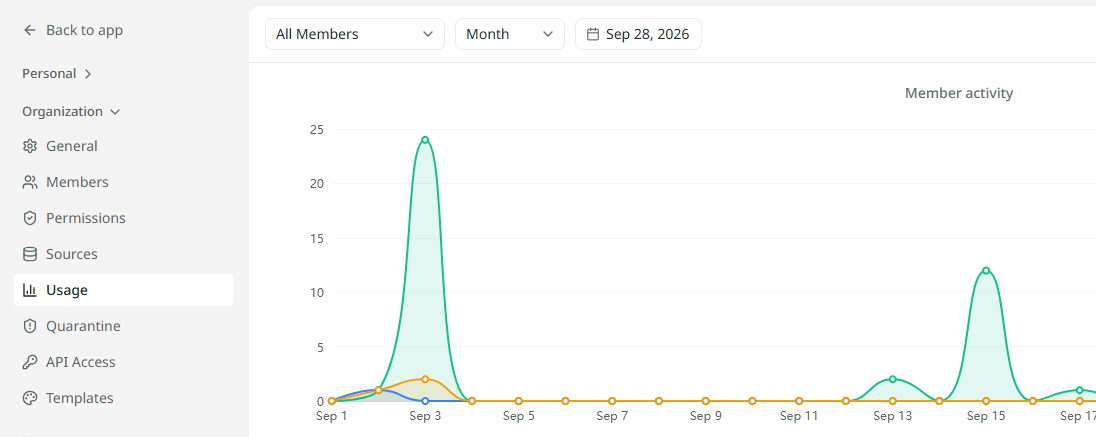
Mira counts its work in credits. Your organisation gets an allowance of credits each month, and every question and upload draws on it. The Usage page in Settings shows how the allowance is being spent and how much is left. Owners and admins can see it.
What uses a credit
| Action | Credits |
|---|---|
| Asking a question | One credit. |
| Asking a question with web search on | More than one, when Mira actually searches the web. See Searching the web. |
| Uploading a file | One credit. |
Seeing your usage
Open Settings and choose Usage. The figures at the top cover the period you pick.
| Figure | What it tells you |
|---|---|
| Credits used | How many credits have gone, out of the monthly allowance. |
| Remaining | How many are left, and how many top-up credits are available. |
| Utilization | The share of the allowance used so far. |
| Searches | How many questions were asked, and how many files were uploaded. |
Below them, Usage over time charts credits day by day, and Top members shows who has used the most. To look at one person, choose them from the All members menu. Use the date picker and the Month and Week switch to change the period.
Allowance and top-ups
The monthly allowance starts again at the beginning of each calendar month. The size of the allowance is part of your organisation's plan.
Top-up credits are extra credits added on top of the allowance. Mira uses them only once the month's allowance has run out. To add a top-up or change your allowance, contact us.