Where data comes from
Two ways in, two places a table can live, and how a table gets to a person.
Overview
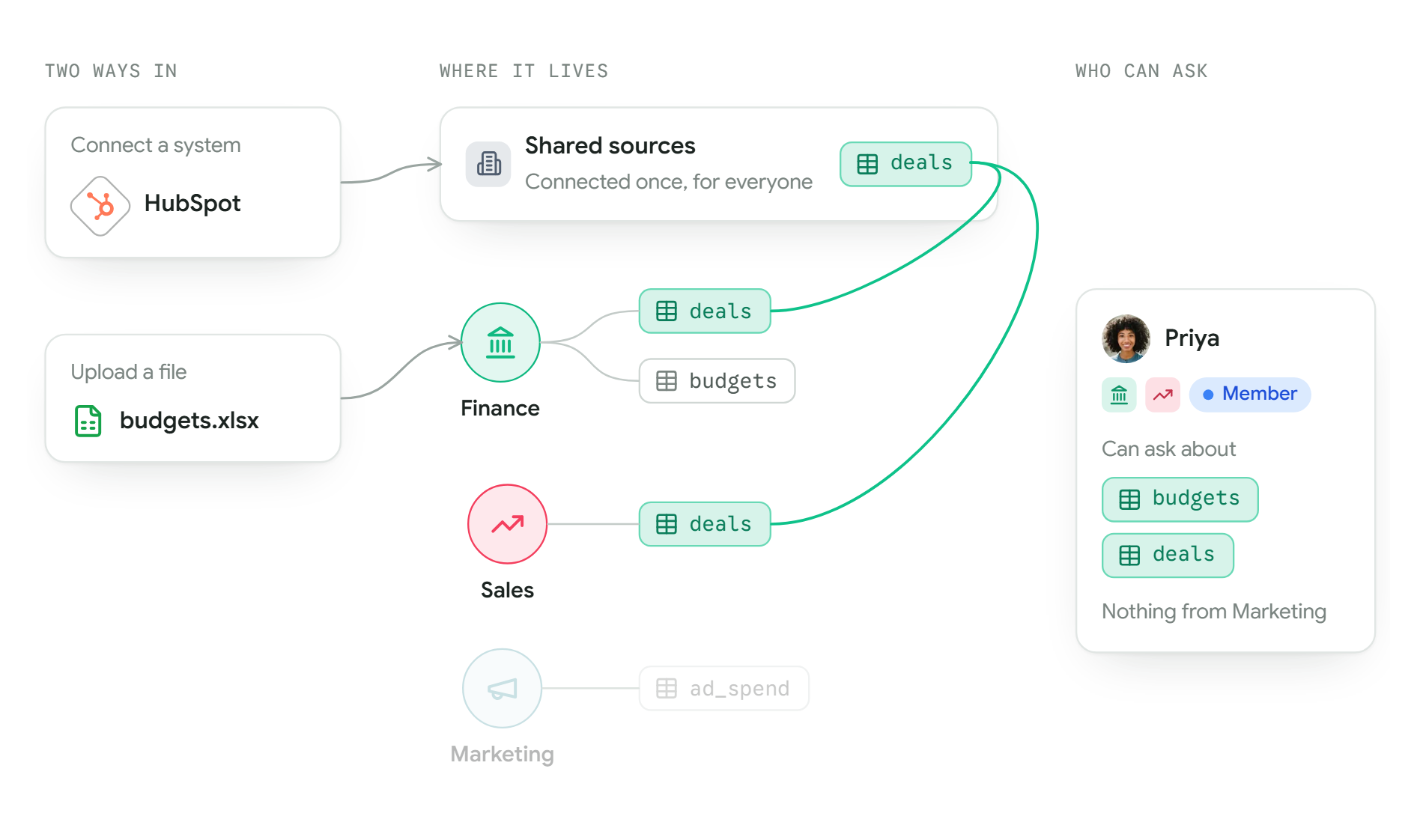
Mira answers from your tables, and only from tables you can see. This page explains where those tables come from, where they live once they are in Mira, and how a table ends up in front of a person. Read it before you add anything, and you will know who can ask about it.
Two ways in
| Way in | What you do | Good for |
|---|---|---|
| Upload a file | Drop in a spreadsheet or CSV file. Each sheet becomes a table. | Plans, budgets, one-off exports, anything that lives in a spreadsheet. |
| Connect a system | Sign in to a system your company already uses, such as HubSpot or Xero. Mira brings in its tables and keeps them up to date. | Anything that changes every day: sales, invoices, orders. |
Mira only ever reads from the systems you connect. It never changes anything in them. Uploading files and Connecting a system show how.
Two places it can live
Every table belongs to one of two places.
| Place | How a table gets there | Who can ask about it |
|---|---|---|
| The organisation's shared sources | An Owner or Admin connects a system or uploads a file in Settings, Sources. | Only the departments it has been shared with. |
| A department's own data | Someone in the department uploads a file on its Data page. | Only that department. |
Connected systems always go into the shared sources, never straight into one department. That way HubSpot is connected once, and each of its tables can be shared with exactly the departments that need it. Shared sources explains the sharing.
At Kestrel Outdoor, the Admin connects HubSpot and shares its deals table with Sales and Finance. Separately, Finance uploads a budgets spreadsheet on its own Data page. Sales and Finance can both ask about deals. Only Finance can ask about budgets.
How a table gets to you
You can ask about a table when two things are true:
- You are in a department that holds it, either because it was uploaded there or because it was shared with that department.
- Your role in that department lets you see its tables.
If you are in two departments, you can ask about the tables of both. Priya is a Member of Finance and of Sales, so she can ask about budgets and about deals. She is not in Marketing, so nothing of Marketing's shows up for her.
Owners and Admins can see every table in the organisation. Everyone else sees only what their departments hold. How departments work explains departments and the roles inside them.
Seeing what you have
The data catalogue lists every department and table you can see, with a map of how they fit together. It is the quickest way to check whether you can see a table.